

This article will be published soon
Scheduled for: 2026-06-07 11:00
The article will appear automatically when the time arrives — no need to refresh.
The Need for an Islamic Desktop Application
On smartphones, there is an abundance of Islamic applications. Apps for adhan, apps for dhikr, apps for Quran, and apps for the Hijri calendar. But on the desktop, options are limited. Many users spend long hours in front of their computers for work or study, and want a lightweight application that reminds them of prayer times, allows them to listen to Quran while working, and displays dhikr and supplications without needing to open a browser.
Noor was created to fill this gap. An open source desktop application that runs on all major platforms and provides a complete Islamic experience in one window.
🔗 Official Repository: github.com/haith2m/noor-app 🔗 Releases Page: github.com/haith2m/noor-app/releases
What Is Noor?
Noor is an open source Islamic desktop application under the MIT license, designed and developed by developer Haitham. The application is built using ElectronJS, ReactJS, and TailwindCSS. It provides four main functions in a clean single interface:
- Display prayer times based on the user’s location with adhan notifications
- Morning, evening, and general dhikr
- Quran listening with multiple reciters
- Hijri calendar with corresponding Gregorian dates
The application supports both Arabic as the primary language and English, and you can switch between them from the settings.
Detailed Features
Prayer Times and Notifications
The application uses the user’s location after permission to calculate prayer times accurately. It supports different calculation methods for Asr, such as the Hanafi and Shafi schools, and allows adjustment of the caution time by adding minutes to each prayer time. When a prayer time enters, a desktop notification appears, and you can enable an adhan sound optionally. The adhan does not play automatically. It simply notifies you that the time has arrived, and you can play the adhan manually from within the application if you wish.
Dhikr Section
The application contains a collection of dhikr divided into sections: morning dhikr, evening dhikr, and general dhikr such as after prayer, before sleep, and upon waking. You can browse dhikr with a button press, with the text of the dhikr and the number of repetitions displayed. The interface is simple and direct, without complexity.
Quran Player
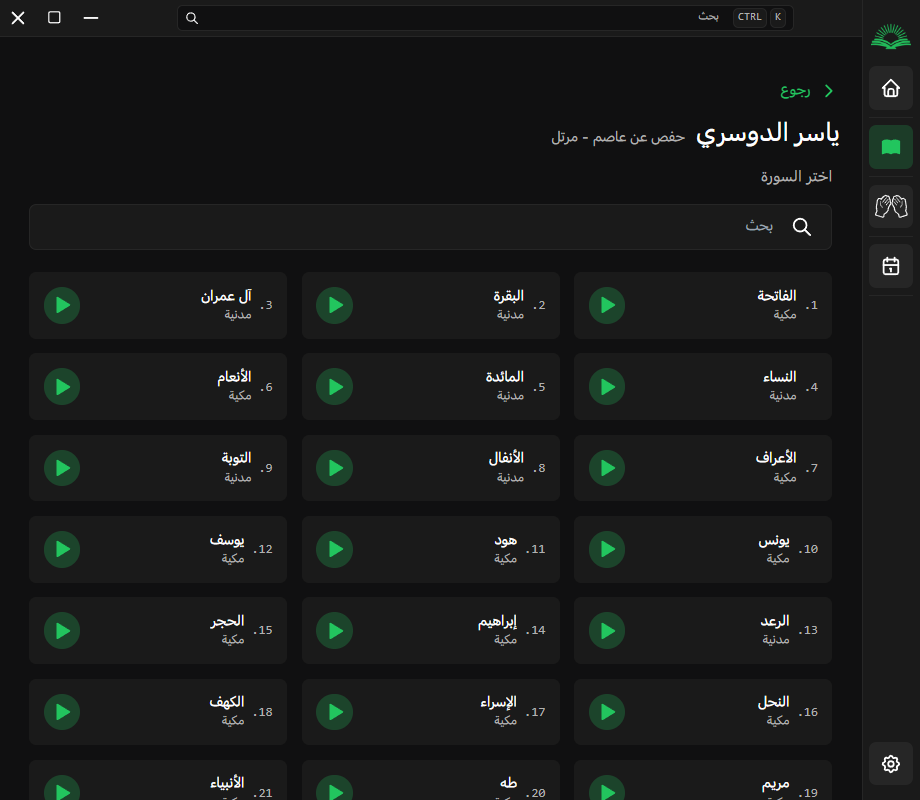
The application includes a built-in audio player that allows you to listen to the Holy Quran. It supports multiple reciters that you can choose from. The player interface is simple with play, pause, next, previous, and a progress bar. You can browse between surahs or select a specific surah from a list. The images below show the Quran player interface and the reciter list:
Hijri Calendar
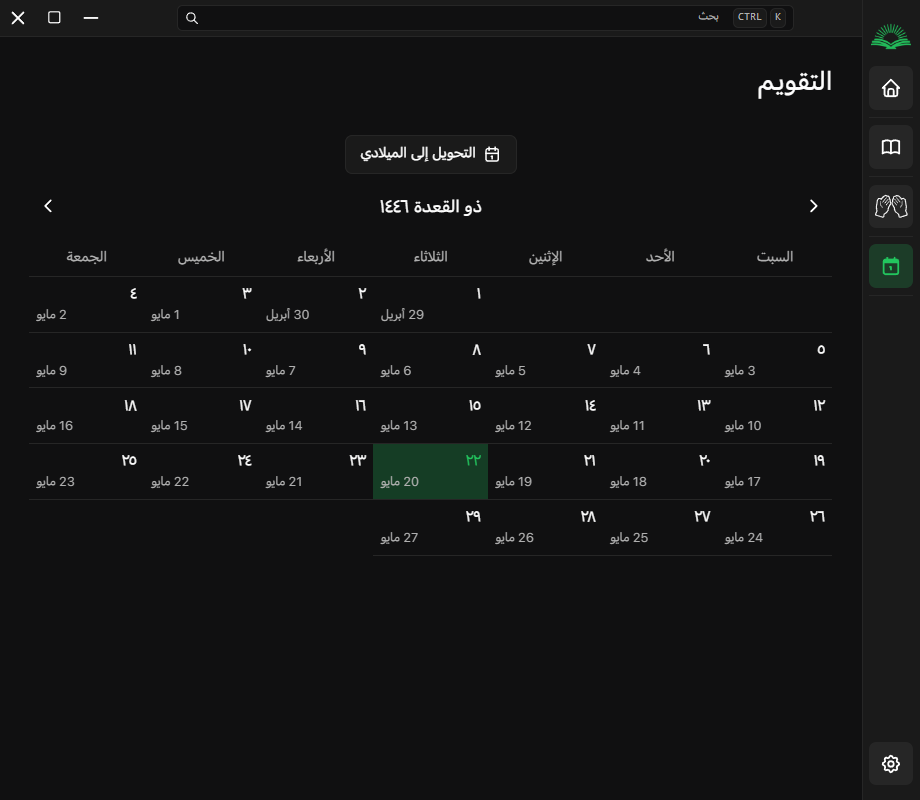
The application displays the current Hijri date according to the Umm al-Qura or lunar calendar depending on settings, with the corresponding Gregorian date. You can navigate between months to view any date in the past or future. The calendar interface is simple and elegant.
Settings
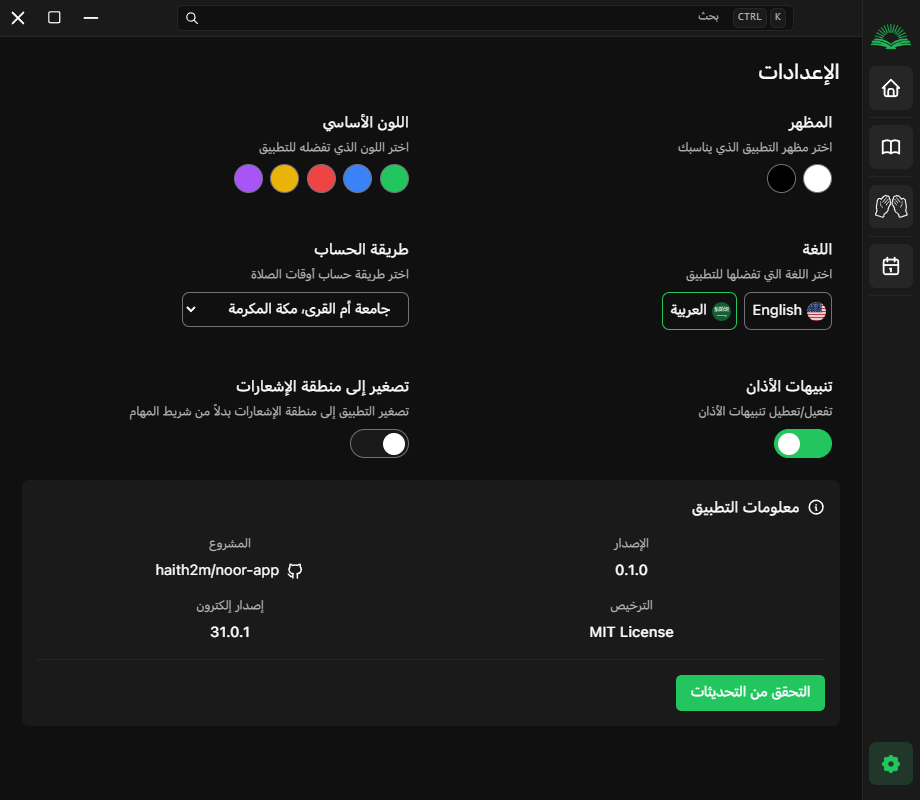
From the settings screen, you can adjust several options:
- Enable or disable notifications
- Enable or disable the adhan sound
- Choose the prayer time calculation method from several available references
- Adjust the caution time by adding minutes to each prayer time
- Select your preferred Quran reciter
- Switch the language between Arabic and English
The image below shows the settings interface:
Installation
You can download the latest version of the application from the releases page on GitHub. The current version is v0.5.0, released on February 3, 2026.
On Windows
Download the noor-app Setup x.x.x.exe file and run it. Follow the installer instructions.
On Linux
Download the noor-app x.x.x.AppImage file. Make it executable:
chmod +x noor-app*.AppImage
./noor-app*.AppImage
If you use a distribution that supports Flatpak, you can watch the repository to see if a Flatpak package becomes available in the future.
On macOS
Download the noor-app x.x.x.dmg file and open it. Drag the application to the Applications folder.
Building from Source
For developers who want to build the application themselves:
git clone https://github.com/haith2m/noor-app.git
cd noor-app
npm install
npm run build
npm start
Customization and Contribution
The project welcomes contributions. If you are a developer and want to improve the interface, add new features such as a pre-prayer reminder, mosque location setting, or additional dhikr, fix bugs, or improve the translation, you can fork the project, create a new branch, add your changes, and then submit a pull request.
Some ideas for future development suggested by the community include:
- Adding a countdown timer for remaining prayer time
- Adding the ability to set a specific mosque location for users who want a specific mosque timing instead of calculated location
- Supporting more Quran reciters
- Adding daily automatically rotating dhikr
- Supporting a mini mode window that stays above other windows
Privacy
The application does not collect any user data. Your geographic location is used only to calculate prayer times locally on your device and is not sent to any external server. There are no ads, no tracking, and no analytics. The application is fully open source, and you can review the code to verify this.
Summary
Noor is not the only Islamic desktop application, but it is one of the cleanest and most technically modern. Its interface is simple, it runs on all major platforms, and it is completely free and open source. If you are looking for an application that reminds you of prayer times while working, or want to listen to the Quran without opening a browser, or want a simple dhikr application that does not bother you with ads, Noor is worth trying.



Reactions & Comments
Sign in with GitHub to leave a comment or react. Powered by Giscus (stored in GitHub Discussions)