
This article will be published soon
Scheduled for: 2026-06-28 18:52
The article will appear automatically when the time arrives — no need to refresh.
The Problem of Multiple Installation Drives
For anyone who installs operating systems frequently, whether a system administrator, developer, or enthusiast, having one USB drive for each operating system is a nightmare. You need a drive for Windows 10, another for Windows 11, a third for Ubuntu, a fourth for Fedora, and a fifth for Arch. Each drive requires formatting and burning the appropriate image, and repeating the process every time you want to add a new system.
Ventoy came to change this equation. One drive holds multiple ISO files, and you select which system to boot from at startup. On June 24, 2026, the developer released version 1.1.14 with important updates.
🔗 Official Website: ventoy.net 🔗 Releases Page: github.com/ventoy/Ventoy/releases
What Is Ventoy?
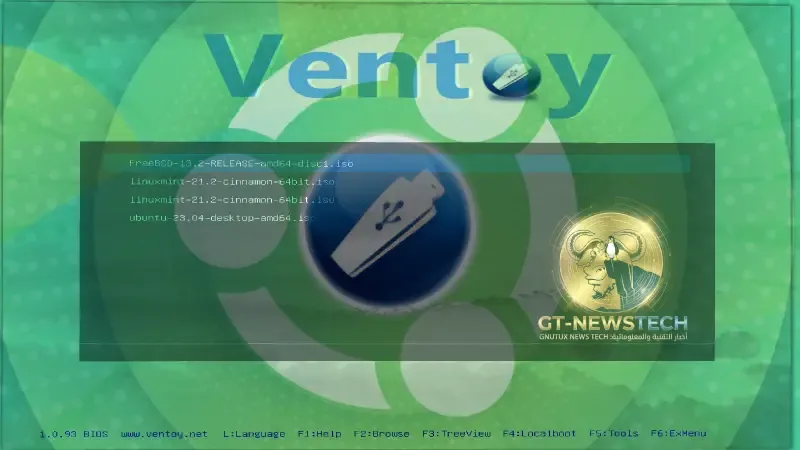
Ventoy is an open source tool that allows you to create a bootable USB drive containing multiple ISO files. All you have to do is install Ventoy on the drive once, then copy ISO files to the drive like any regular files. When you boot from the drive, a menu appears with all the ISO files present, you choose what you want, and the system starts booting.
The most important feature is that you do not need to reformat the drive to add or remove ISOs. Just copy or delete ISO files as you would with any regular drive.
Ventoy supports over 1100 ISO images for various operating systems: Windows from 7 to 11, major Linux distributions such as Ubuntu, Fedora, Debian, Arch, and openSUSE, BSD systems, recovery tools, and various utility programs.
It works in both BIOS and UEFI modes and supports Secure Boot with an official Microsoft signature.
What Is New in Version 1.1.14?
Fix for the UEFI CA 2023 Issue
The most important change in this release is the update to the Secure Boot shim certificate to fix the UEFI CA 2023 issue. This issue relates to updates in the digital certificate infrastructure used for signing bootloaders. Without this update, newer devices, especially those manufactured after 2023, may show error messages when attempting to boot via Ventoy in Secure Boot mode.
With version 1.1.14, Ventoy uses a new CA certificate. This means that when booting for the first time on a new device, you will be prompted to add the new key to the trusted keys list in UEFI. This process only happens once.
New Option for Controlling Secure Boot Policy
Ventoy added the VTOY_SECURE_BOOT_POLICY option in the Global Control Plugin. This allows users to specify how Ventoy handles Secure Boot policy on their devices, providing more flexibility in environments with strict security requirements.
VentoyPlugson Update
VentoyPlugson, the tool that allows customizing Ventoy settings through a web interface, has been updated to align with the new changes in version 1.1.14.
New Project: iVentoy
With this release, the developer also mentioned his new project iVentoy, an enhanced PXE server that allows network booting. Any device on the network, such as a computer, laptop, server, or Raspberry Pi, can act as a PXE server and boot operating systems over the network without needing USB drives. iVentoy supports over 110 types of operating systems and works in Legacy BIOS, UEFI 32/64, and ARM64 modes.
Download and Update
Ventoy 1.1.14 can be downloaded from the releases page on GitHub or from the official website.
| File | SHA-256 |
|---|---|
ventoy-1.1.14-linux.tar.gz |
96add45625f7634726bc64633ddaf93851f183e00beabf556c5ab7f1b080a81a |
ventoy-1.1.14-livecd.iso |
91d6694664e14ff10d73034f6f9c22d1c0a376a0f7889773564c1b7bf948f9c9 |
ventoy-1.1.14-windows.zip |
3dc0baf85a183bb8fc72b49ea0646d259984c37b6a6dc61ce7087fe8ce187075 |
Ventoy can be updated on an existing USB drive without data loss using the built-in update tool in the application.
Summary
Ventoy is one of those tools that any multi-boot user cannot do without. Version 1.1.14 is an essential maintenance update ensuring the tool continues to work with modern devices that enforce new UEFI certificates. If you currently use Ventoy, updating is necessary to ensure compatibility with new devices. If you have not tried it yet, this is an excellent opportunity to experience the easiest way to manage multiple boot drives.
Quick Links
https://github.com/ventoy/Ventoy
https://github.com/ventoy/Ventoy/releases/tag/v1.1.14
Published in the Free and Open Source Software section – System and Boot Tools



Reactions & Comments
Sign in with GitHub to leave a comment or react. Powered by Giscus (stored in GitHub Discussions)